


Year / Release Date: 2019
Version: 8.55
System Requirements: VT-X Support
2-4 core or stream processor
4GB RAM
Interface language: Multilingual
Description:
DIAGBOX ONLY
For the past 3 years, from the moment I posted the versions of programs for the PSA concern here
There was a request for an update, so I am sharing version 8.55 which has machine support up to 2017.
Multilanguage: 20 languages: Chinese, Croatian, Czech, Danish, Dutch, English, Finnish, French, German, Greek, Italian, Japanese, Hungary, Polish, Portuguese, Russian, Slovenian, Spanish, Swedish and Turkish
Switching through a program on the desktop: Diagbox Language Switcher
To switch, enter the first 2 letters of your language from the available list.
Setup:
1. Download torrent, turn off attribute only read in properties folder.
2. Download VWMare Workstation or VMWare Player over 12.0 version
3. Open VMWare program
4. Click to OPEN VIRTUAL MACHINE

5. Find file "Diagbox.vmx" from this torrent
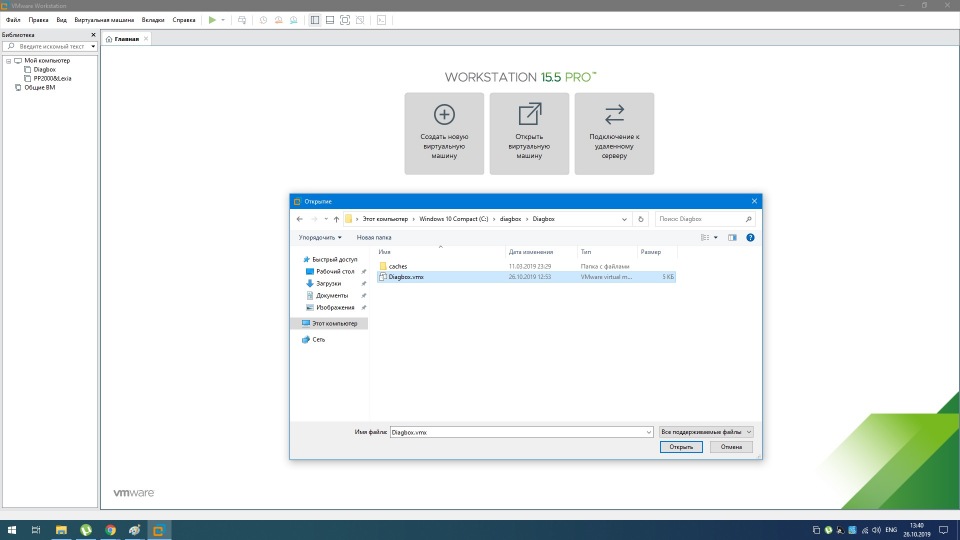
6. Open this file, CHANGE OWNER(if will he ask), click to I MOVED IT
For correctly working VMWare products you need support VT-X technology, if you PC don't have this technology, you need change this PC for other with support technology or analogy other technology. If you PC have VT-X technology or other analogy, you need turn on in BIOS VT-X or Intel VT (Intel Virtualization Technology) or other name difference: BIOS, he version, or manufactured processors.
Description:
content includes: VMware 12 image with XP Pro SP3 32bit English and pre-activated Diagbox 8.55 (v07.855) Multilanguage ; as well as VMware 12 image with XP Pro SP3 32bit English
Part 1: VMware 12 image with XP Pro SP3 32bit English and pre-activated Diagbox 8.55 (v07.855) Multilanguage
- VMware 12 image with XP Pro SP3 32bit English
- Diagbox 8.55 (v07.855) Multilanguage | 09/2017 (20 languages: Chinese, Croatian, Czech, Danish, Dutch, English, Finnish, French, German, Greek, Italian, Japanese, Hungary, Polish, Portuguese, Russian, Slovenian, Spanish, Swedish and Turkish)
- PSA XS Evolution Interface Drivers
- PSA XS Evolution Interface Automatic Firmware 4.3.7 updating, Launcher_850 by Simple
- Diagbox Language Switcher
- Diagbox Killer
- PSA Interface Checker + All Firmware's from 2.0.1 to 4.3.7
- Backup APPDIAG.sys activation file in Desktop
Diagbox 8.55 (v07.855) Desktop-01 Diagbox 8.55 (v07.855)-02 Diagbox Language Switcher-03 Diagbox APPLI Software-04 PSA Interface Checker + Firmware 4.3.7-05
Info of Launcher_850:
Contents of the "C:\AWRoot\bin\launcher" folder, this release includes firmware versions:
LX = Lexia and PP2000
DB = DiagBox
APPLI.COM
APPLI_4.2.0 LP.COM
APPLI_4.2.2 LP.COM
APPLI_4.3.0 DB.COM
APPLI_4.3.2 DB.COM
APPLI_4.3.3 DB.COM
APPLI_4.3.4 DB.COM
APPLI_4.3.5 DB.COM
1- Make a backup of all files in your "C:\AWRoot\bin\launcher" folder, no need to include folders inside \launcher.
2- Extract all files of the "launcher850.zip" into "C:\AWRoot\bin\launcher" overwriting existing files.
3- Connect your XS Evolution VCI and start DiagBox
4- DiagBox will check current firmware version and (upgrade/downgrade) using the file APPLI.COM, if necessary.
To change the Firmware version, rename the desired Firmware file from APPLI_X.X.X.COM to APPLI.COM.
launcher850.zip (into torrent)
The update function can be disabled by setting "MAJ_COM=TRUE" to "MAJ_COM=FALSE" in "C:\AWRoot\bin\Launcher\ap.ini"
In case reverting to the original setting is needed,
1- Delete all files (only) inside "C:\AWRoot\bin\launcher".
2- Restore backed-up files back to their original state.
Other similar tutorials
PSA Diagbox 8.55 (07.855) 2019
viewtopic.php?f=211&t=4749
PSA Lexia 3 v.1.4.13 + PP 2000 v.1.9.12 . 2019 multilingue
viewtopic.php?f=211&t=4744
Download section, see bottom of this page
Other magnet torrent


