


The new E.A.SY. Diagnostic System for IVECO commercial vehicles has an entirely new instruction handbook.
In addition to new graphics, the handbook structure follows new principles.Topics are presented in “modules” which form independent units. The manual consists of the following units:
Hw installation
Sw installation
Sw interface
acceptance
ECU diagnosis
programming
active diagnosis
engine test
electrical diagram
guide to the diagnosis
eltracscope
Bluetooth Device
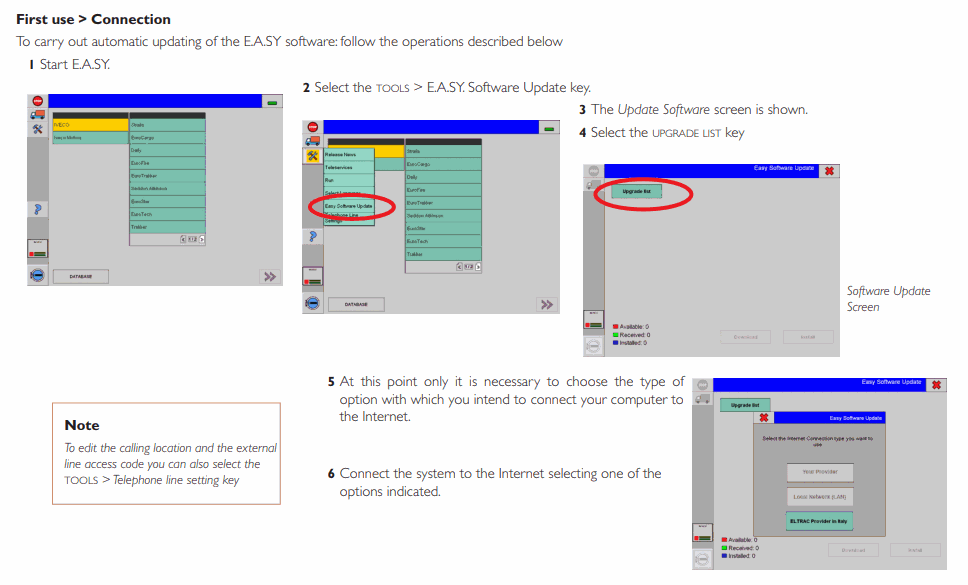
sw automatic updating
cer tifications
Instruction Activate Iveco Easy
1): Install BUS DVD
DVD (X) \ easy \ setup \ easy \ setup.exe
2): Run K-e-y-g-e-n1.exe
a) Click: Read Current and OK
b) Click: Generate New and OK
3): Install TRUCK DVD
Autorun .exe
4): Copy and replace Framework.StationInformationWriter.dll to C: \ Program Files \ Eltrac \ EASY \ Bin \ EasyNET
5): Open Easy on desktop and close.
6): Run K-e-y-g-e-n2.exe
a) Set Expiration Date
b) Set ECI Number. EXSAMPLE: EC-01009-04-05-04
c) Click: All
d) Click: Get
e) Create new ECIs.txt file and wrote in ur ECI Number. EXSAMPLE: EC-01009-04-05-04
f) Re-name: easy_all.txt to actCodes.txt
g) Copy actCodes.txt + ECIs.txt to Windows XP & Windows 7: C: \ Program Files \ Eltrac \ EASY \ Db \ Perms
h) Copy files and folders (pSets, pSetsNet, rSets, rSetsNet, actCodes.txt, ACIs .txt) replace to Windows XP: C: \ Documents and Settings \ All Users \ Application Data \ Iveco \ Easy \ Perms Windows 7: C: \ ProgramDATA \ Iveco \ Easy \ Perms
I've never been into trucking software.
Section téléchargement, voir en bas de cette page
Download section, see bottom of this page


