


How To ?
Procedures :
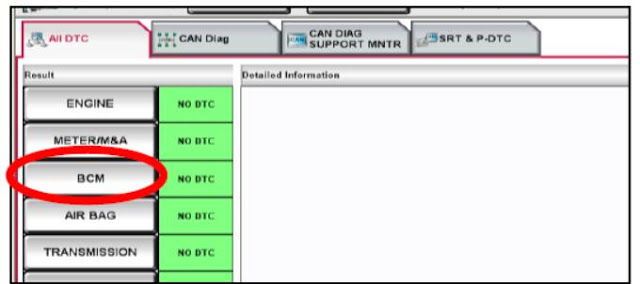
1 - From the Consult -III plus "All Dtc" Screen, Select the 'BCM'
2 - Select "Multi Remote Entry"

3 - Select "Work Support"

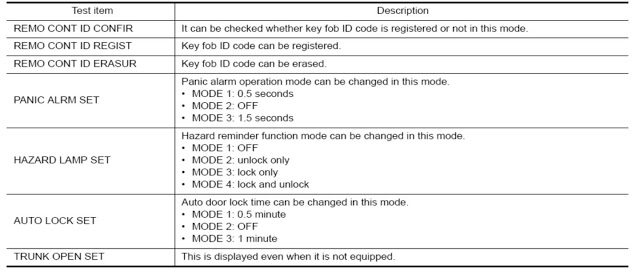
4 - When the next screen appears ,(section shown below)select "REMO CONT ID REGIST"function to program the remotes .

ID Code Entery Procedure
STEP 1
Close all doors (Observe the operation of the interior light with each door to ensure the door switches are OK).
STEP 2
Operate lock using the drive side door lock and unlock switch (on P/Window swassy)
STEP 3
1. Remove and insert the key into ingnition key 6 times within 10 seconds (turning the key barrel switch from OFF to ON counts as1 time)
2. Hazard warning lamp blinks and all door unlocks.
Note : On the sixth key insertion ,keep the key in the cylinder with the key barrel switch ON .Does the hazard lamp blink and doors unlock ? Yes >> Go To Step 4.ON >>GoTo Step 1.
STEP 4
Within 3 seconds after the hazard lamp blinks and all door unlocks ,turn ignition switch to the ACC position and operate lock using the driver side door lock and unlock switch.
STEP 5
Press the lock or unlock button of the keyfobo be added .
All doors unlock simultaneously.
Hazard warning lamp blinks and all door unlocks.
Key ID is registerd
Is Key ID registred ?
Yes -1>>When adding a keyfob :Go To Step 6.
Yes 2->>When ending registration :GO To Step 8
No >>Go To Step 1.
STEP 6
Operate lock using the driver side door lock and unlock switch.
STEP 7
Press the lock or unlock button of the keyfobo be added .
All doors unlock simultaneously.
Hazard warning lamp blinks and all door unlocks.
Key ID is registerd
Is Key ID registred ?
Yes -1>>When adding a keyfob :Go To Step 6.
Yes 2->>When ending registration :GO To Step 8
No >>Go To Step 6.
Open the doors >> REGISTRATION END.
Download Nissan consult 3+ plus V83.11.00
Download section, see bottom of this page


